
🔐 Cybersecurity & Digital Safety
- 🚫 Don’t click suspicious links
- 🔑 Use strong passwords (don’t reuse)
- 📩 Report suspicious emails
- 👀 “If it feels wrong, ask for help”
Providing reliable, secure, and student-focused technology support for the Britton-Hecla School District.
| [Text Alert] Don't Reply to a "Wrong Number." You Will Become a Scam Target
Attackers are using "wrong-number" texts to identify potential targets for scams, according to researchers at Malwarebytes. These texts appear to be harmless messages meant for another person, such as "Are we still on for dinner tomorrow?" or "Where's the PowerPoint?" Recipients often try to be helpful by replying to let the person know they've got the wrong number. This reply, however, informs the threat actor that the phone number is active and marks it for future scams. "Let's be clear: the 'wrong number' text is not a phishing link," the researchers explain. "It's not malware. In many cases, it's not even the scam itself. It's a personality test. "The scammers already have your number. They may have bought it in bulk from a data breach for a fraction of a cent per record. They already know the message was delivered because their SMS gateway received no delivery failure. Text messages remain one of the most effective ways to reach people, with exceptionally high open rates and most being read within minutes. That's one reason scammers prefer SMS to email." If you reply to one of these texts, the attackers also learn the following things about you:
AI-native security awareness training can help your employees understand how attackers think so they can avoid falling for social engineering tactics. Over 70,000 organizations worldwide trust the KnowBe4 Platform to strengthen their security culture and reduce workforce risk. Blog post with links: |
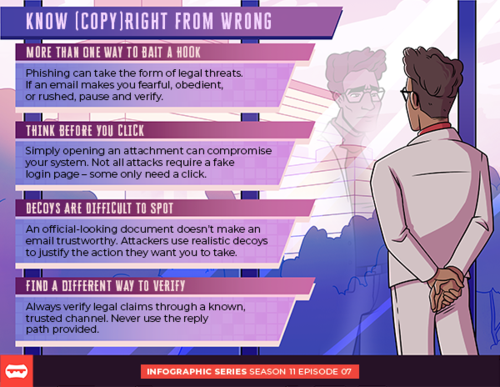
Cybercriminals are becoming increasingly sophisticated, using emails, text messages, and documents that appear legitimate to trick people into sharing information or taking harmful actions. A few simple precautions can help keep you safe.
Watch for emotional triggers.
Phishing messages often create a sense of urgency, fear, or pressure. If a message makes you feel rushed or worried, take a moment to pause and verify before responding.
Think before you click.
Malicious attachments and links can compromise your device and personal information. Not every attack involves a fake login page—sometimes simply opening an attachment is enough.
Don't trust appearances alone.
Official logos, professional formatting, and convincing language do not guarantee an email is legitimate. Attackers frequently use realistic-looking documents and messages to gain trust.
Verify through trusted channels.
If you receive a message claiming to be from a business, government agency, financial institution, or another organization, contact that organization directly using a phone number or website you know is legitimate. Avoid replying to the message or using the contact information it provides.
Pause. Verify. Protect. Taking a few extra moments to confirm a message is authentic can prevent fraud, identity theft, and cybersecurity incidents.